
- Google Translate

Firefox Browser

TikTok

Google Chrome

Waze

DiDi-Rider

Calm

Life360: Family Locator & GPS Tracker for Safety

Snapchat
Advertisement
Additional Information
-
- Developer
- Google LLC
-
- OS
- Android Ios Pc
-
- Price
- Free
-
- Total
- 269
-
- Genre
- Tools,
Advertisement
-
Update:
March 18, 2021
Size:
26.87 MB
Version:
2021.3.18
Compatibility:
Android 4.1 and up
Content Rating:
Everyone
-
Update:
Size:
Version:
Compatibility:
Android 4.1
Content Rating:
Everyone
Link provided by Apple Store
Get it from Google PlayLink provided by Google Play
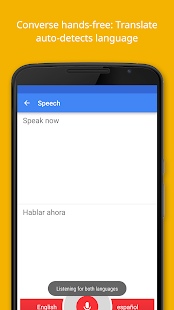
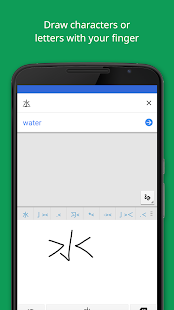
Introduction to - Google Translate
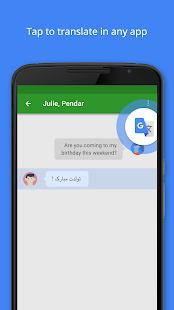
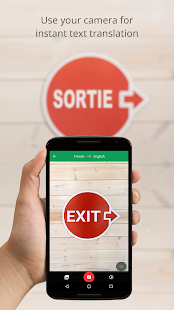
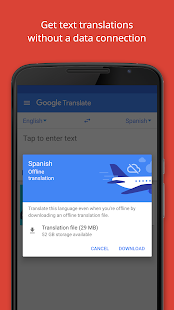
Google Translate helps you translate between 103 kinds of languages. It allows you to translate by simply tapping after you copy the object text in the blank. Moreover, you can even translate 52 languages when you are offline.Instant camera helps you translate text instantly in 29 languages. Features: Use your camera to translate texts instantly Provide two-way automatic speech translation Offline translation by downloading language packs Save translations for future reference Draw with fingers as a keyboard Supported Languages: Afrikaans, Albanian, Arabic, Armenian, Azerbaijani, Basque, Belarusian, Bengali, Bosnian, Bulgarian, Catalan, Cebuano, Chichewa, Chinese (Simplified), Chinese (Traditional), Croatian, Czech, Danish, Dutch, English, Esperanto, Estonian, Filipino, Finnish, French, Galician, Georgian, German, Greek, Gujarati, Haitian Creole, Hausa, Hebrew, Hindi, Hmong, Hungarian, Icelandic, Igbo, Indonesian, Irish, Italian, Japanese, Javanese, Kannada, Kazakh, Khmer, Korean, Lao, Latin, Latvian, Lithuanian, Macedonian, Malagasy, Malay, Malayalam, Maltese, Maori, Marathi, Mongolian, Myanmar (Burmese), Nepali, Norwegian, Persian, Polish, Portuguese, Punjabi, Romanian, Russian, Serbian, Sesotho, Sinhala, Slovak, Slovenian, Somali, Spanish, Sundanese, Swahili, Swedish, Tajik, Tamil, Telugu, Thai, Turkish, Ukrainian, Urdu, Uzbek, Vietnamese, Welsh, Yiddish, Yoruba, Zulu
1. First of all, download and install it.
2, open Google Translate real-time translation; first select [language], at this time, you can see in the screen there are text real-time translation, photo translation, voice real-time translation, handwritten doodle translation, etc., such as text translation; just in the white blank, enter the Chinese characters, words and phrases you want to translate, and the blue part is the English results of real-time translation. At the same time, you can also try to listen to the pronunciation language by clicking on [Little Speaker].
3、If you want to translate Chinese into English, you only need to press the [Chinese] button on the voice page, and when the small microphone shows "Please start speaking", then speak what you want to say in Mandarin, and the screen will also show the Chinese and English words in real time. When the Chinese is finished, it will be automatically translated with English pronunciation. Other languages will be translated as above.
4, in the real-time voice page, press the middle [microphone] it will change to bilingual translation state, it can listen to two languages at the same time, for one can speak Chinese, one can speak English, you can communicate in real time through bilingual translation.
5、For the lens translation function, just tap the photo button, aim at the pictures, books, posters, or all items with text, and then press [Scan].
- Good App Guaranteed:
- This app passed the security test for virus,malware and other malicious attacks and doesn’t contain any theats.
Recommended for you
-

- Spotify: Discover new music
- Whether you're looking for your next
- Live Weather
- Download the most popular free local wea

- Tango
- Tango is a free online messaging and vid
-

- Truecaller
- Brief Truecaller is an app where you c

- Tinder - Dating & Meet People
- Tinder is a mobile social application de

- Discord
- Discord is a cross-platform voice and te
Hot Games
-

- Minecraft
- Ultimate Sandbox Experience for Everyone

- ROBLOX
- If you like playing Lego games, then you

- Toca Boca World
- Want to play a game where you can create
-

- Toca Boo
- Want to have fun spooking your family me

- Among Us!
- This is one of the top 10 best online ga

- Pokemon Go
- If you loved playing Pokemon games earli





Leave a Comment